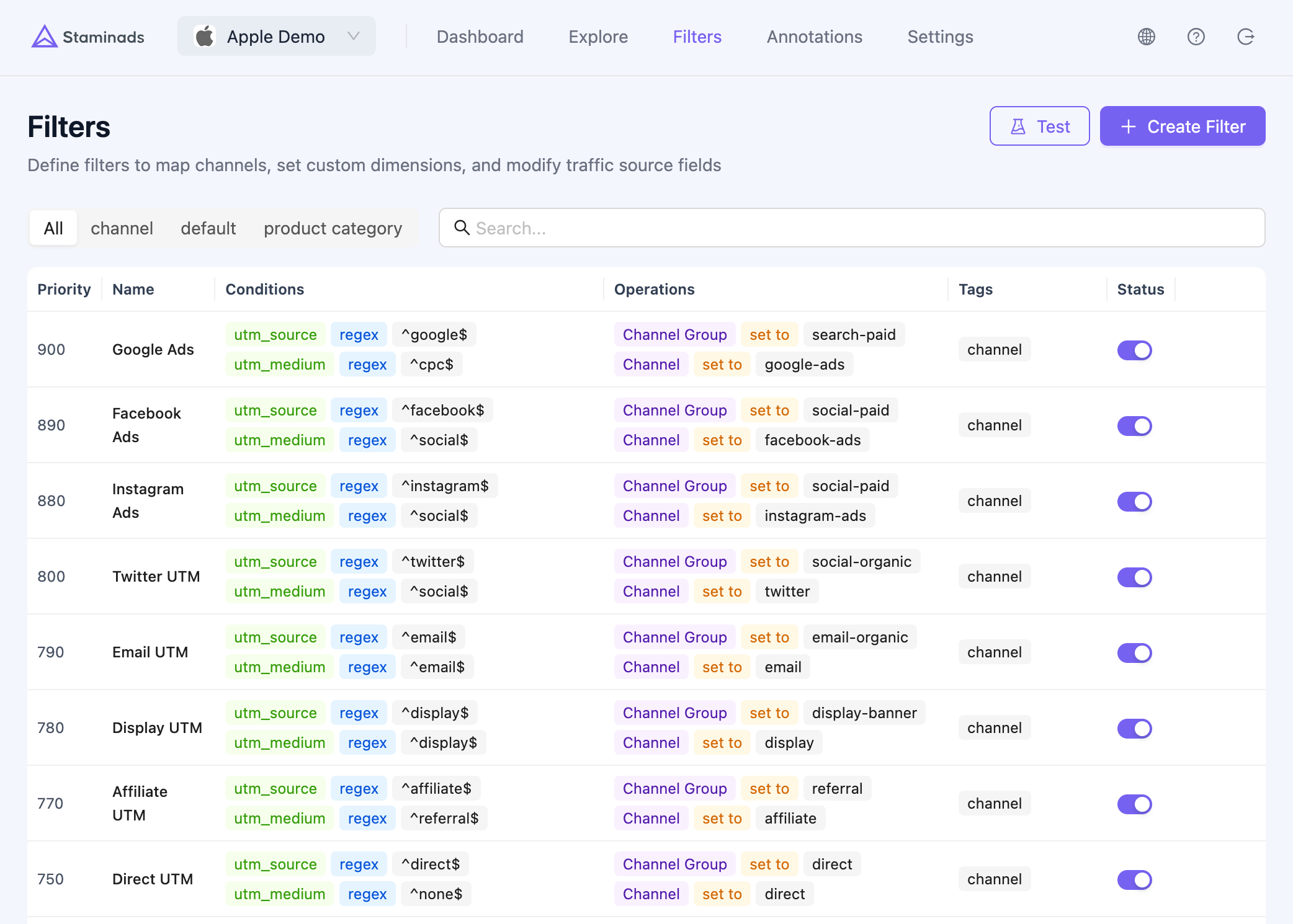
Filters let you categorize your traffic by defining rules that match sessions and assign them to channels, groups, or custom dimensions. This is the foundation of meaningful traffic analysis in Staminads.
Filters list page showing all configured traffic categorization rules
A default set of common traffic sources is created for you (Google SEO, Google Ads, Facebook Ads, TikTok Ads, etc.). However, you should create filters for your specific traffic sources to avoid them being grouped as “not categorized”.

How Filters Work

Each filter consists of:
  1. Conditions — Rules that match incoming sessions (e.g., “utm_source contains google”)
  2. Operations — What to do when conditions match (e.g., “set channel to Google Ads”)
  3. Priority — When multiple filters match, the highest priority wins
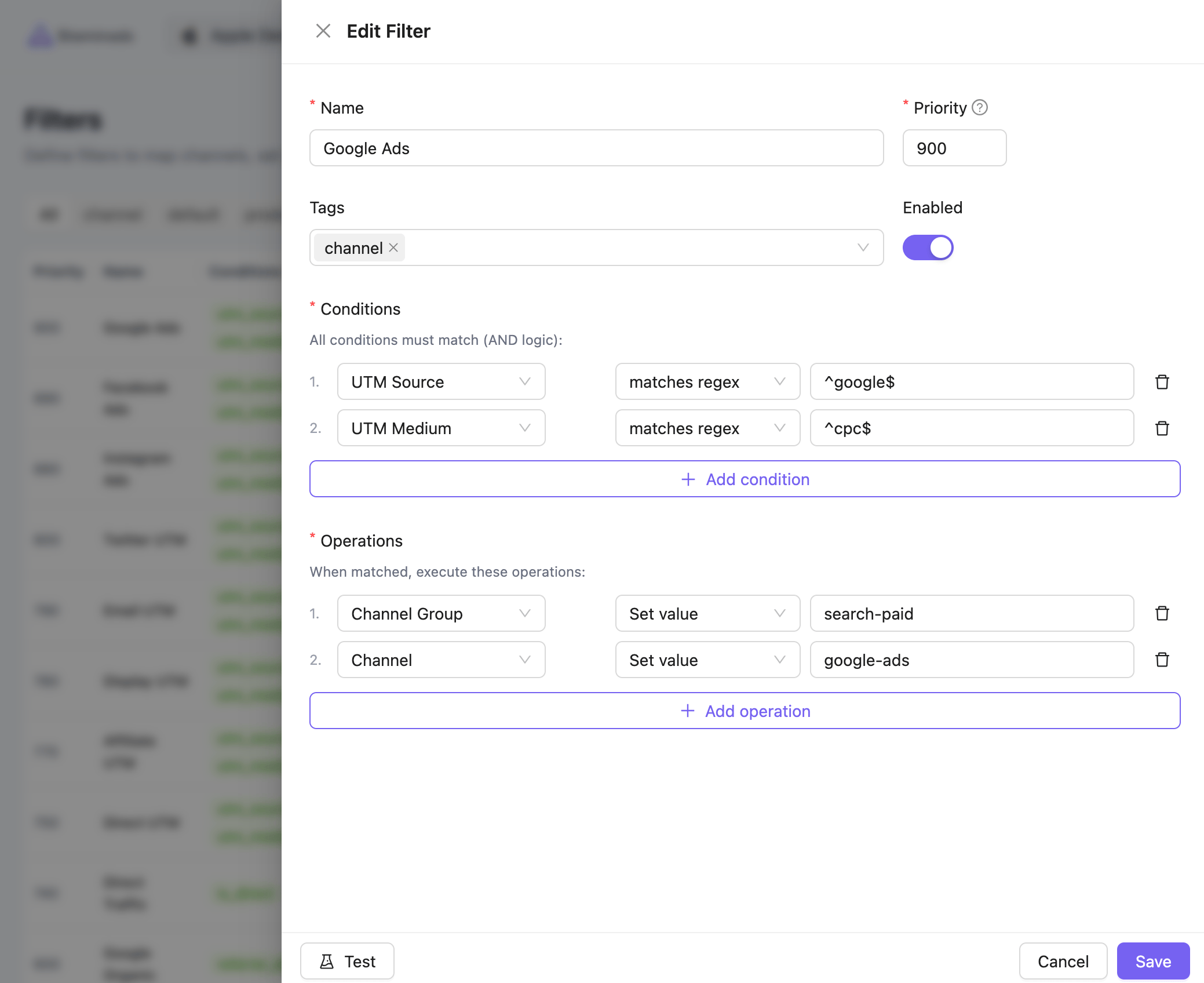
Session arrives → Conditions evaluated → Operations applied → Session categorized
Filter form showing conditions and operations configuration

What You Can Match (Conditions)

Filters can match on a wide range of session attributes:
CategoryFields
UTMutm_source, utm_medium, utm_campaign, utm_term, utm_content, utm_id, utm_id_from
Trafficreferrer, referrer_domain, referrer_path, is_direct
Pageslanding_page, landing_domain, landing_path, path
Devicedevice, browser, browser_type, os, user_agent, connection_type
Geolanguage, timezone

Operators

OperatorDescription
equalsExact match
not equalsDoes not match exactly
containsContains substring
not containsDoes not contain substring
is emptyField has no value
is not emptyField has a value
matches regexMatches regular expression pattern

What You Can Set (Operations)

When conditions match, filters can write to these dimensions:
CategoryDimensions
Channelchannel, channel_group
Customstm_1 through stm_10 (Custom Dimension 1-10)
UTMutm_source, utm_medium, utm_campaign, utm_term, utm_content
Trafficreferrer_domain, is_direct

Actions

ActionDescription
Set valueAlways set to the specified value
Clear valueSet to null/empty
Set defaultSet only if the field is currently empty

Custom Dimension Labels

By default, custom dimensions are labeled stm_1 through stm_10. You can assign meaningful names to these dimensions in Workspace Settings > Custom Dimensions to make reports easier to understand.
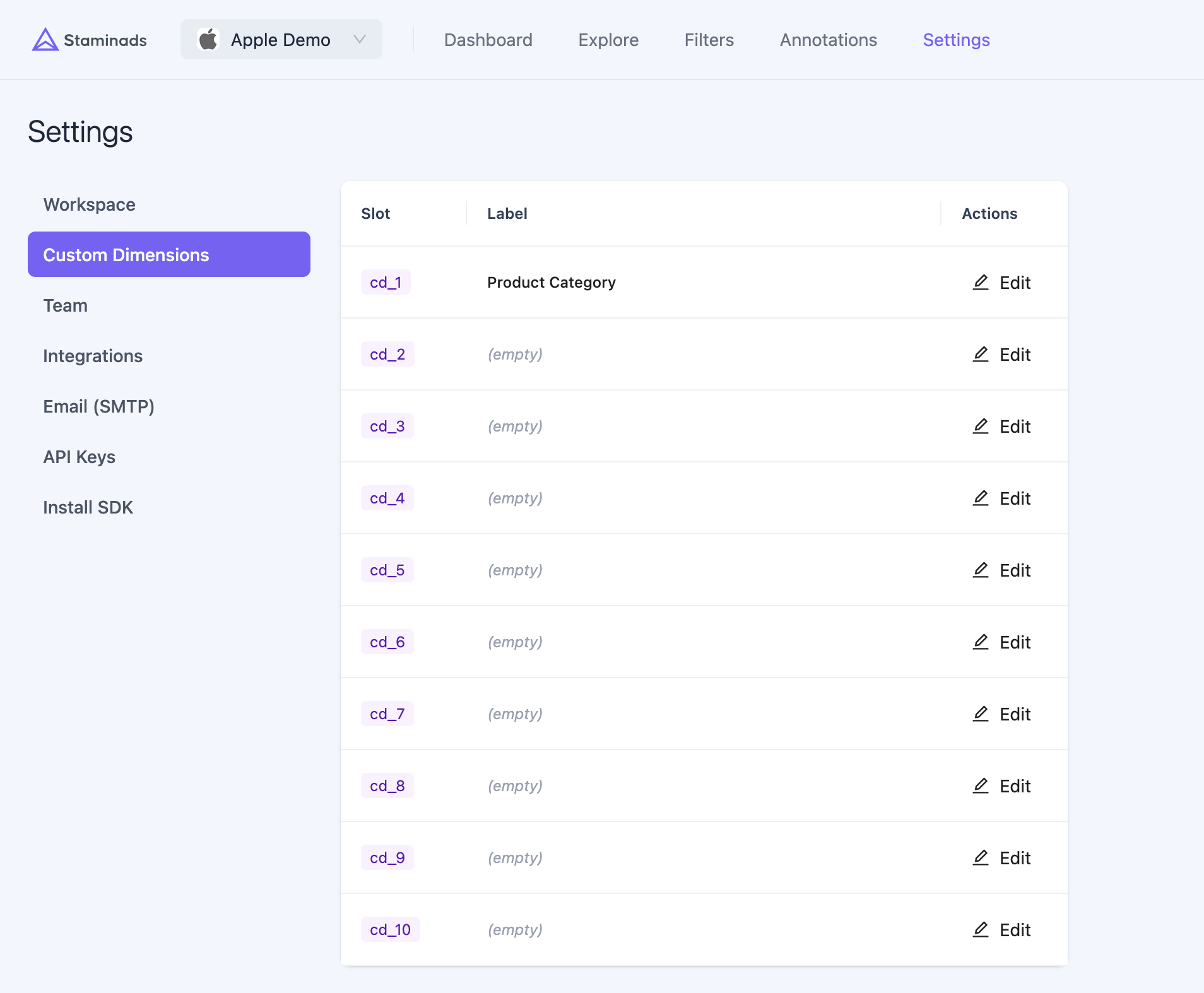
Custom dimension labels configuration in workspace settings
Example labels:
SlotLabel
stm_1Product Category
stm_2Funnel Stage
stm_3Content Type
Once labeled, reports will display “Product Category” instead of “stm_1”, making your data more intuitive to analyze.

Use Cases

Channel Mapping

The most common use case — categorize traffic by marketing channel. Example: Google Ads filter
  • Condition: utm_id_from equals gclid
  • Operation: Set channel to Google Ads, set channel_group to Paid Search
Example: Google SEO filter
  • Condition: referrer_domain contains google
  • Condition: utm_id_from is empty
  • Operation: Set channel to Google SEO, set channel_group to Organic

Page Categorization

Use custom dimensions to categorize pages by product, funnel stage, or content type. Example: Product category filter
  • Condition: landing_path contains /shoes/
  • Operation: Set stm_1 (Product Category) to Shoes
Example: Funnel stage filter
  • Condition: landing_path equals /pricing
  • Operation: Set stm_2 (Funnel Stage) to Consideration

Brand vs Non-Brand Organic

Separate branded searches (people searching for your company name) from generic organic traffic. Example: Brand organic filter
  • Condition: landing_path equals /
  • Condition: referrer_domain contains google
  • Condition: utm_medium equals referral
  • Condition: utm_id_from is empty
  • Operation: Set channel to Brand Organic, set channel_group to Direct
Brand organic traffic typically lands on your homepage from Google without UTM parameters. These visitors already know your brand — they should be measured separately from discovery-phase organic traffic.

Priority & Overlap

When a session matches multiple filters, the filter with the highest priority (0-1000) wins. Example priority structure:
PriorityFilterRationale
900Google AdsSpecific paid traffic, should override organic
800Facebook AdsSpecific paid traffic
500Google SEOGeneral organic
500Direct TrafficGeneral direct
100Catch-allDefault for unmatched traffic

Backfill Historical Data

When you create or modify filters, they only apply to new sessions by default. Use the Backfill feature to apply your current filter rules to historical data. This is useful when:
  • You add a new filter and want it to apply retroactively
  • You fix a misconfigured filter
  • You add new custom dimensions
Backfilling rewrites dimension values for historical sessions. The operation is safe (original source data is preserved), but large date ranges may take time to process.

UTM Parameters Reference

UTM parameters are the standard way to tag campaign URLs for tracking.
ParameterDescriptionExample
utm_sourceTraffic sourcegoogle, facebook, newsletter
utm_mediumMarketing mediumcpc, email, social, referral
utm_campaignCampaign nameblack-friday-2025, spring-sale
utm_termPaid search keywordsrunning shoes, best crm
utm_contentAd variationbanner-v1, text-link

Ad Network Click Identifiers

Staminads automatically extracts click IDs from ad network URLs and stores them in two fields:
FieldDescription
utm_idThe click ID value
utm_id_fromOrigin of the click ID (see table below)
Google uses multiple click identifiers depending on the user’s device and privacy settings:
ParameterNameWhen Used
gclidGoogle Click IDDesktop, Android, and iOS users who grant tracking consent
gbraidGoogle Browser IDiOS 14.5+ web clicks when user declines tracking (privacy-preserving, aggregated)
wbraidGoogle Web IDiOS web-to-web and app-to-web journeys when gclid cannot be passed
Unlike gclid which identifies individual clicks, gbraid and wbraid are privacy-preserving parameters that use aggregated signals to comply with Apple’s App Tracking Transparency (ATT) framework.

Other Ad Networks

ParameterAd Network
fbclidMeta (Facebook, Instagram)
msclkidMicrosoft Ads (Bing)
ttclidTikTok Ads
li_fat_idLinkedIn Ads
twclidTwitter/X Ads
dclidGoogle Display & Video 360
Example: A Google Ads click generates a URL like:
https://example.com?utm_source=google&utm_medium=cpc&gclid=Cj0KCAiAxea5...
Staminads extracts:
  • utm_id = Cj0KCAiAxea5...
  • utm_id_from = gclid
To reliably identify Google Ads traffic regardless of which click ID is used, create a filter with:
  • utm_id_from matches regex ^(gclid|gbraid|wbraid)$