> ## Documentation Index
> Fetch the complete documentation index at: https://docs.staminads.com/llms.txt
> Use this file to discover all available pages before exploring further.
# Traffic Categorization
> Categorize your traffic using flexible filter rules
Filters let you categorize your traffic by defining rules that match sessions and assign them to channels, groups, or custom dimensions. This is the foundation of meaningful traffic analysis in Staminads.
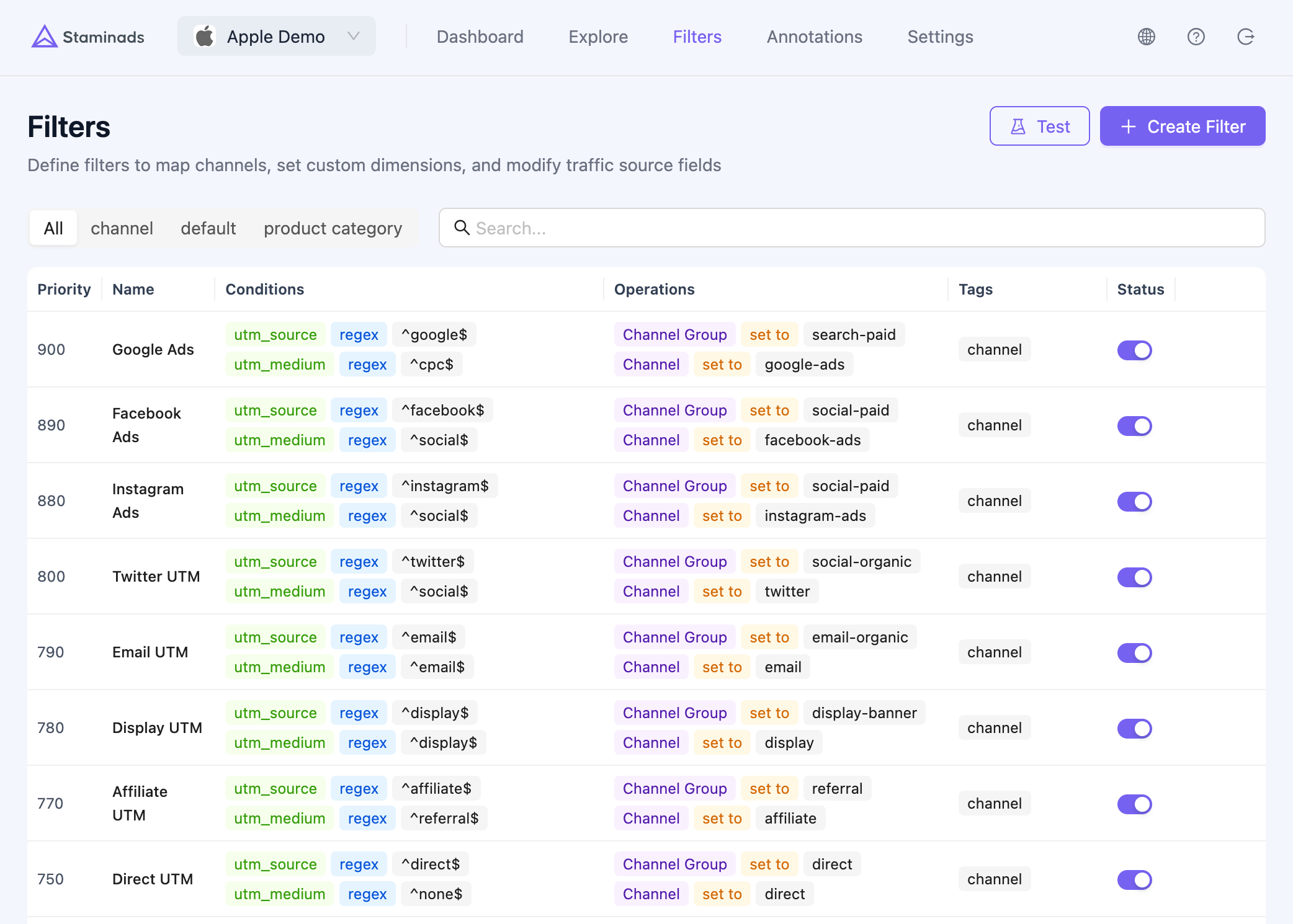 A default set of common traffic sources is created for you (Google SEO, Google Ads, Facebook Ads, TikTok Ads, etc.). However, **you should create filters for your specific traffic sources** to avoid them being grouped as "not categorized".
## How Filters Work
Each filter consists of:
1. **Conditions** — Rules that match incoming sessions (e.g., "utm\_source contains google")
2. **Operations** — What to do when conditions match (e.g., "set channel to Google Ads")
3. **Priority** — When multiple filters match, the highest priority wins
```
Session arrives → Conditions evaluated → Operations applied → Session categorized
```
A default set of common traffic sources is created for you (Google SEO, Google Ads, Facebook Ads, TikTok Ads, etc.). However, **you should create filters for your specific traffic sources** to avoid them being grouped as "not categorized".
## How Filters Work
Each filter consists of:
1. **Conditions** — Rules that match incoming sessions (e.g., "utm\_source contains google")
2. **Operations** — What to do when conditions match (e.g., "set channel to Google Ads")
3. **Priority** — When multiple filters match, the highest priority wins
```
Session arrives → Conditions evaluated → Operations applied → Session categorized
```
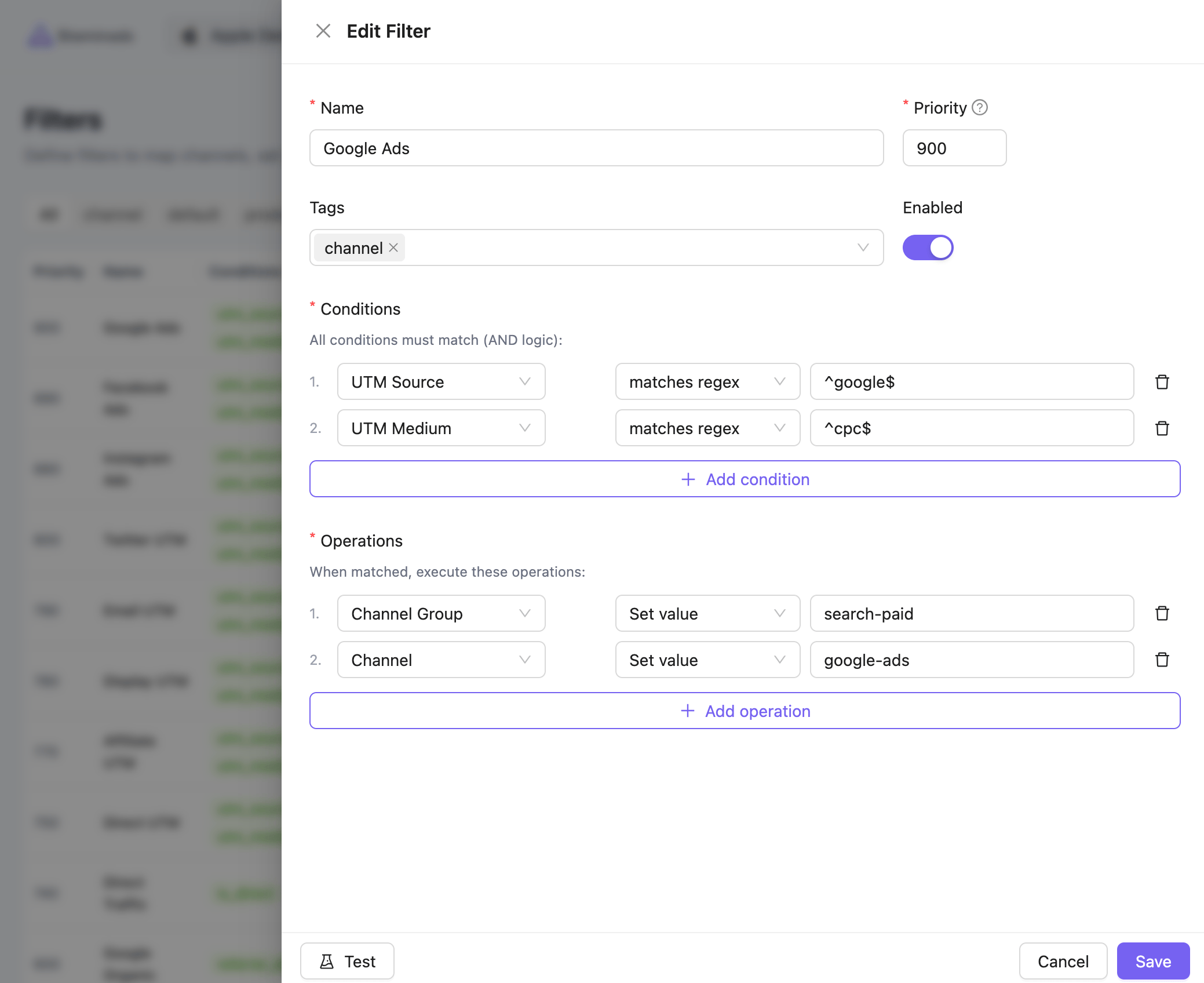 ## What You Can Match (Conditions)
Filters can match on a wide range of session attributes:
| Category | Fields |
| ----------- | ---------------------------------------------------------------------------------------------- |
| **UTM** | `utm_source`, `utm_medium`, `utm_campaign`, `utm_term`, `utm_content`, `utm_id`, `utm_id_from` |
| **Traffic** | `referrer`, `referrer_domain`, `referrer_path`, `is_direct` |
| **Pages** | `landing_page`, `landing_domain`, `landing_path`, `path` |
| **Device** | `device`, `browser`, `browser_type`, `os`, `user_agent`, `connection_type` |
| **Geo** | `language`, `timezone` |
### Operators
| Operator | Description |
| --------------- | ---------------------------------- |
| `equals` | Exact match |
| `not equals` | Does not match exactly |
| `contains` | Contains substring |
| `not contains` | Does not contain substring |
| `is empty` | Field has no value |
| `is not empty` | Field has a value |
| `matches regex` | Matches regular expression pattern |
## What You Can Set (Operations)
When conditions match, filters can write to these dimensions:
| Category | Dimensions |
| ----------- | --------------------------------------------------------------------- |
| **Channel** | `channel`, `channel_group` |
| **Custom** | `stm_1` through `stm_10` (Custom Dimension 1-10) |
| **UTM** | `utm_source`, `utm_medium`, `utm_campaign`, `utm_term`, `utm_content` |
| **Traffic** | `referrer_domain`, `is_direct` |
### Actions
| Action | Description |
| --------------- | ---------------------------------------- |
| **Set value** | Always set to the specified value |
| **Clear value** | Set to null/empty |
| **Set default** | Set only if the field is currently empty |
## Custom Dimension Labels
By default, custom dimensions are labeled `stm_1` through `stm_10`. You can assign meaningful names to these dimensions in **Workspace Settings > Custom Dimensions** to make reports easier to understand.
## What You Can Match (Conditions)
Filters can match on a wide range of session attributes:
| Category | Fields |
| ----------- | ---------------------------------------------------------------------------------------------- |
| **UTM** | `utm_source`, `utm_medium`, `utm_campaign`, `utm_term`, `utm_content`, `utm_id`, `utm_id_from` |
| **Traffic** | `referrer`, `referrer_domain`, `referrer_path`, `is_direct` |
| **Pages** | `landing_page`, `landing_domain`, `landing_path`, `path` |
| **Device** | `device`, `browser`, `browser_type`, `os`, `user_agent`, `connection_type` |
| **Geo** | `language`, `timezone` |
### Operators
| Operator | Description |
| --------------- | ---------------------------------- |
| `equals` | Exact match |
| `not equals` | Does not match exactly |
| `contains` | Contains substring |
| `not contains` | Does not contain substring |
| `is empty` | Field has no value |
| `is not empty` | Field has a value |
| `matches regex` | Matches regular expression pattern |
## What You Can Set (Operations)
When conditions match, filters can write to these dimensions:
| Category | Dimensions |
| ----------- | --------------------------------------------------------------------- |
| **Channel** | `channel`, `channel_group` |
| **Custom** | `stm_1` through `stm_10` (Custom Dimension 1-10) |
| **UTM** | `utm_source`, `utm_medium`, `utm_campaign`, `utm_term`, `utm_content` |
| **Traffic** | `referrer_domain`, `is_direct` |
### Actions
| Action | Description |
| --------------- | ---------------------------------------- |
| **Set value** | Always set to the specified value |
| **Clear value** | Set to null/empty |
| **Set default** | Set only if the field is currently empty |
## Custom Dimension Labels
By default, custom dimensions are labeled `stm_1` through `stm_10`. You can assign meaningful names to these dimensions in **Workspace Settings > Custom Dimensions** to make reports easier to understand.
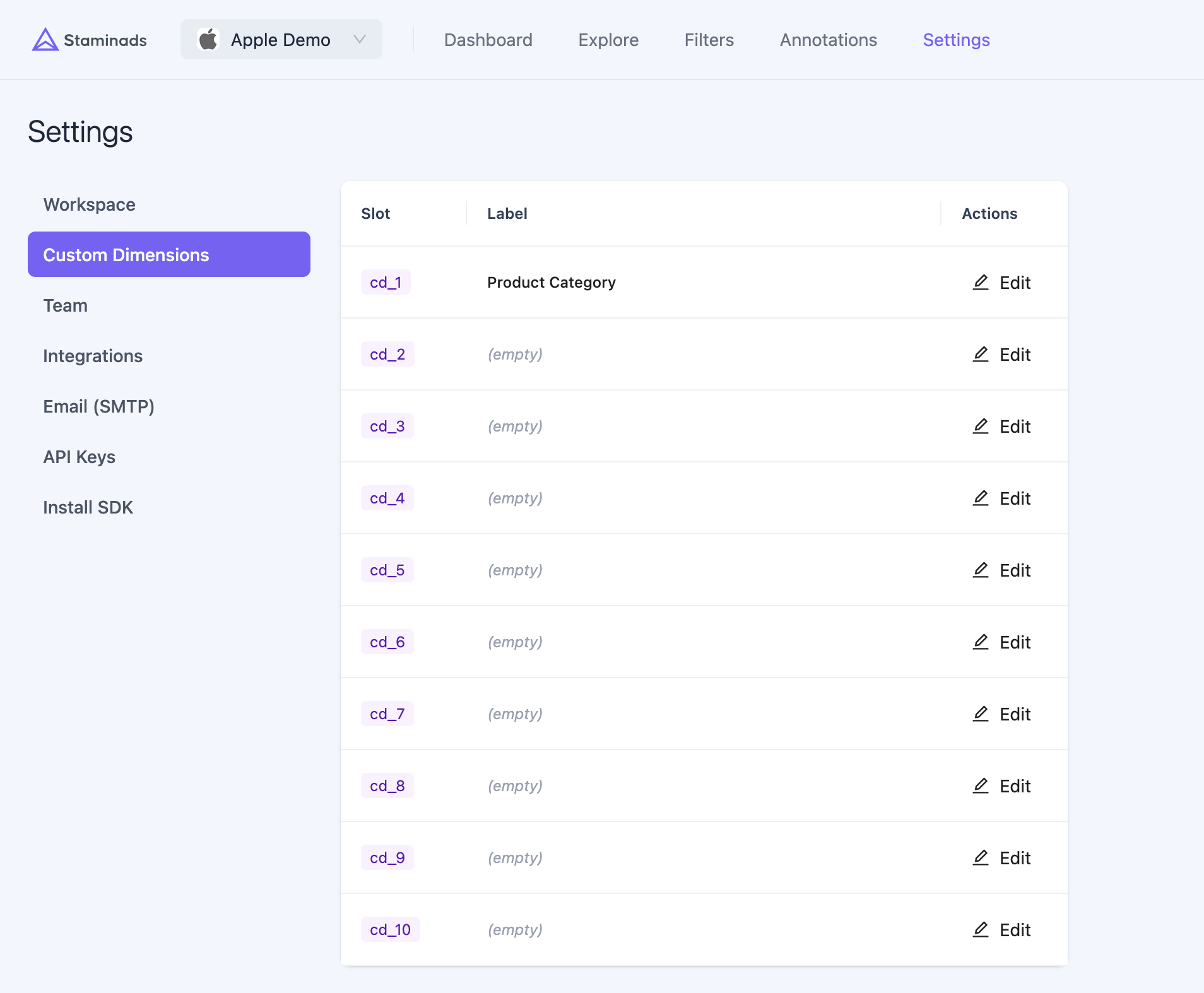 **Example labels:**
| Slot | Label |
| ------- | ---------------- |
| `stm_1` | Product Category |
| `stm_2` | Funnel Stage |
| `stm_3` | Content Type |
Once labeled, reports will display "Product Category" instead of "stm\_1", making your data more intuitive to analyze.
## Use Cases
### Channel Mapping
The most common use case — categorize traffic by marketing channel.
**Example: Google Ads filter**
* Condition: `utm_id_from` equals `gclid`
* Operation: Set `channel` to `Google Ads`, set `channel_group` to `Paid Search`
**Example: Google SEO filter**
* Condition: `referrer_domain` contains `google`
* Condition: `utm_id_from` is empty
* Operation: Set `channel` to `Google SEO`, set `channel_group` to `Organic`
### Page Categorization
Use custom dimensions to categorize pages by product, funnel stage, or content type.
**Example: Product category filter**
* Condition: `landing_path` contains `/shoes/`
* Operation: Set `stm_1` (Product Category) to `Shoes`
**Example: Funnel stage filter**
* Condition: `landing_path` equals `/pricing`
* Operation: Set `stm_2` (Funnel Stage) to `Consideration`
### Brand vs Non-Brand Organic
Separate branded searches (people searching for your company name) from generic organic traffic.
**Example: Brand organic filter**
* Condition: `landing_path` equals `/`
* Condition: `referrer_domain` contains `google`
* Condition: `utm_medium` equals `referral`
* Condition: `utm_id_from` is empty
* Operation: Set `channel` to `Brand Organic`, set `channel_group` to `Direct`
Brand organic traffic typically lands on your homepage from Google without UTM parameters. These visitors already know your brand — they should be measured separately from discovery-phase organic traffic.
## Priority & Overlap
When a session matches multiple filters, the filter with the **highest priority** (0-1000) wins.
**Example priority structure:**
| Priority | Filter | Rationale |
| -------- | -------------- | ---------------------------------------------- |
| 900 | Google Ads | Specific paid traffic, should override organic |
| 800 | Facebook Ads | Specific paid traffic |
| 500 | Google SEO | General organic |
| 500 | Direct Traffic | General direct |
| 100 | Catch-all | Default for unmatched traffic |
## Backfill Historical Data
When you create or modify filters, they only apply to new sessions by default. Use the **Backfill** feature to apply your current filter rules to historical data.
This is useful when:
* You add a new filter and want it to apply retroactively
* You fix a misconfigured filter
* You add new custom dimensions
Backfilling rewrites dimension values for historical sessions. The operation is safe (original source data is preserved), but large date ranges may take time to process.
## UTM Parameters Reference
UTM parameters are the standard way to tag campaign URLs for tracking.
| Parameter | Description | Example |
| -------------- | -------------------- | ------------------------------------ |
| `utm_source` | Traffic source | `google`, `facebook`, `newsletter` |
| `utm_medium` | Marketing medium | `cpc`, `email`, `social`, `referral` |
| `utm_campaign` | Campaign name | `black-friday-2025`, `spring-sale` |
| `utm_term` | Paid search keywords | `running shoes`, `best crm` |
| `utm_content` | Ad variation | `banner-v1`, `text-link` |
### Ad Network Click Identifiers
Staminads automatically extracts click IDs from ad network URLs and stores them in two fields:
| Field | Description |
| ------------- | ---------------------------------------- |
| `utm_id` | The click ID value |
| `utm_id_from` | Origin of the click ID (see table below) |
#### Google Ads Click IDs
Google uses multiple click identifiers depending on the user's device and privacy settings:
| Parameter | Name | When Used |
| --------- | ----------------- | --------------------------------------------------------------------------------- |
| `gclid` | Google Click ID | Desktop, Android, and iOS users who grant tracking consent |
| `gbraid` | Google Browser ID | iOS 14.5+ web clicks when user declines tracking (privacy-preserving, aggregated) |
| `wbraid` | Google Web ID | iOS web-to-web and app-to-web journeys when gclid cannot be passed |
Unlike `gclid` which identifies individual clicks, `gbraid` and `wbraid` are privacy-preserving parameters that use aggregated signals to comply with Apple's App Tracking Transparency (ATT) framework.
#### Other Ad Networks
| Parameter | Ad Network |
| ----------- | -------------------------- |
| `fbclid` | Meta (Facebook, Instagram) |
| `msclkid` | Microsoft Ads (Bing) |
| `ttclid` | TikTok Ads |
| `li_fat_id` | LinkedIn Ads |
| `twclid` | Twitter/X Ads |
| `dclid` | Google Display & Video 360 |
**Example:** A Google Ads click generates a URL like:
```
https://example.com?utm_source=google&utm_medium=cpc&gclid=Cj0KCAiAxea5...
```
Staminads extracts:
* `utm_id` = `Cj0KCAiAxea5...`
* `utm_id_from` = `gclid`
To reliably identify Google Ads traffic regardless of which click ID is used, create a filter with:
* `utm_id_from` matches regex `^(gclid|gbraid|wbraid)$`
**Example labels:**
| Slot | Label |
| ------- | ---------------- |
| `stm_1` | Product Category |
| `stm_2` | Funnel Stage |
| `stm_3` | Content Type |
Once labeled, reports will display "Product Category" instead of "stm\_1", making your data more intuitive to analyze.
## Use Cases
### Channel Mapping
The most common use case — categorize traffic by marketing channel.
**Example: Google Ads filter**
* Condition: `utm_id_from` equals `gclid`
* Operation: Set `channel` to `Google Ads`, set `channel_group` to `Paid Search`
**Example: Google SEO filter**
* Condition: `referrer_domain` contains `google`
* Condition: `utm_id_from` is empty
* Operation: Set `channel` to `Google SEO`, set `channel_group` to `Organic`
### Page Categorization
Use custom dimensions to categorize pages by product, funnel stage, or content type.
**Example: Product category filter**
* Condition: `landing_path` contains `/shoes/`
* Operation: Set `stm_1` (Product Category) to `Shoes`
**Example: Funnel stage filter**
* Condition: `landing_path` equals `/pricing`
* Operation: Set `stm_2` (Funnel Stage) to `Consideration`
### Brand vs Non-Brand Organic
Separate branded searches (people searching for your company name) from generic organic traffic.
**Example: Brand organic filter**
* Condition: `landing_path` equals `/`
* Condition: `referrer_domain` contains `google`
* Condition: `utm_medium` equals `referral`
* Condition: `utm_id_from` is empty
* Operation: Set `channel` to `Brand Organic`, set `channel_group` to `Direct`
Brand organic traffic typically lands on your homepage from Google without UTM parameters. These visitors already know your brand — they should be measured separately from discovery-phase organic traffic.
## Priority & Overlap
When a session matches multiple filters, the filter with the **highest priority** (0-1000) wins.
**Example priority structure:**
| Priority | Filter | Rationale |
| -------- | -------------- | ---------------------------------------------- |
| 900 | Google Ads | Specific paid traffic, should override organic |
| 800 | Facebook Ads | Specific paid traffic |
| 500 | Google SEO | General organic |
| 500 | Direct Traffic | General direct |
| 100 | Catch-all | Default for unmatched traffic |
## Backfill Historical Data
When you create or modify filters, they only apply to new sessions by default. Use the **Backfill** feature to apply your current filter rules to historical data.
This is useful when:
* You add a new filter and want it to apply retroactively
* You fix a misconfigured filter
* You add new custom dimensions
Backfilling rewrites dimension values for historical sessions. The operation is safe (original source data is preserved), but large date ranges may take time to process.
## UTM Parameters Reference
UTM parameters are the standard way to tag campaign URLs for tracking.
| Parameter | Description | Example |
| -------------- | -------------------- | ------------------------------------ |
| `utm_source` | Traffic source | `google`, `facebook`, `newsletter` |
| `utm_medium` | Marketing medium | `cpc`, `email`, `social`, `referral` |
| `utm_campaign` | Campaign name | `black-friday-2025`, `spring-sale` |
| `utm_term` | Paid search keywords | `running shoes`, `best crm` |
| `utm_content` | Ad variation | `banner-v1`, `text-link` |
### Ad Network Click Identifiers
Staminads automatically extracts click IDs from ad network URLs and stores them in two fields:
| Field | Description |
| ------------- | ---------------------------------------- |
| `utm_id` | The click ID value |
| `utm_id_from` | Origin of the click ID (see table below) |
#### Google Ads Click IDs
Google uses multiple click identifiers depending on the user's device and privacy settings:
| Parameter | Name | When Used |
| --------- | ----------------- | --------------------------------------------------------------------------------- |
| `gclid` | Google Click ID | Desktop, Android, and iOS users who grant tracking consent |
| `gbraid` | Google Browser ID | iOS 14.5+ web clicks when user declines tracking (privacy-preserving, aggregated) |
| `wbraid` | Google Web ID | iOS web-to-web and app-to-web journeys when gclid cannot be passed |
Unlike `gclid` which identifies individual clicks, `gbraid` and `wbraid` are privacy-preserving parameters that use aggregated signals to comply with Apple's App Tracking Transparency (ATT) framework.
#### Other Ad Networks
| Parameter | Ad Network |
| ----------- | -------------------------- |
| `fbclid` | Meta (Facebook, Instagram) |
| `msclkid` | Microsoft Ads (Bing) |
| `ttclid` | TikTok Ads |
| `li_fat_id` | LinkedIn Ads |
| `twclid` | Twitter/X Ads |
| `dclid` | Google Display & Video 360 |
**Example:** A Google Ads click generates a URL like:
```
https://example.com?utm_source=google&utm_medium=cpc&gclid=Cj0KCAiAxea5...
```
Staminads extracts:
* `utm_id` = `Cj0KCAiAxea5...`
* `utm_id_from` = `gclid`
To reliably identify Google Ads traffic regardless of which click ID is used, create a filter with:
* `utm_id_from` matches regex `^(gclid|gbraid|wbraid)$`